
A container escape is when a process running inside a container breaks out of its isolation and gains access to the host or to other containers on the same node. It almost always comes through one of three doors: a risky configuration (a privileged container, a mounted Docker socket or a host path), a powerful Linux capability such as CAP_SYS_ADMIN, or a vulnerability in the kernel or the container runtime. Because every container on a host shares the same kernel, a single kernel bug can be enough.
In this blog, we will explore the nature of container escapes in cloud-native environments, their root causes, the systems at risk, and the real-world consequences of these vulnerabilities. We will also cover how to audit your systems, immediate remediation steps, and long-term security best practices.
As enterprises increasingly adopt Docker, Kubernetes, and other container orchestration platforms, the reliance on shared-kernel architectures has grown significantly. While these technologies deliver exceptional efficiency, density, and scalability, they introduce unique security challenges. The Linux kernel’s namespaces, cgroups, and seccomp mechanisms provide process-level isolation, but they do not offer the same hardware-enforced boundaries as traditional virtual machines.
This article examines the technical foundations of container isolation, prominent escape vectors including the “Attack of the Vsock” (CVE-2025-21756), and strategies to transition toward more robust, hardware-backed security models suitable for multi-tenant cloud platforms.
The Fundamentals of Linux Container Isolation
The Linux kernel utilizes namespaces to partition resources such that one set of processes operates in isolation from others. Key namespaces include:
- PID namespace: Provides process isolation.
- Mount namespace: Isolates filesystem views.
- Network namespace: Separates network stacks.
- User namespace: Maps container UIDs/GIDs to host values.
- UTS, IPC, and Cgroup namespaces: Handle hostname, inter-process communication, and resource controls.
Complementing namespaces are cgroups for resource limiting and seccomp for syscall filtering. Tools like Docker and containerd leverage these primitives through the Open Container Initiative (OCI) runtime specification, with runc as the default low-level runtime.
Despite these controls, shared-kernel designs mean that a vulnerability in the host kernel or runtime can potentially allow a compromised container to affect the host or neighboring containers. This shared responsibility model demands continuous evaluation of isolation limits.
Common Container Escape Vectors
Container escapes typically exploit one or more of the following:
- Runtime Misconfigurations: Mounting sensitive host paths (e.g., /var/run/docker.sock, /proc, or host filesystem volumes) grants containers undue privileges. A container with access to the Docker socket can spawn new privileged containers on the host.
- Kernel Vulnerabilities: Flaws like Dirty COW (CVE-2016-5195), Dirty Pipe (CVE-2022-0847), io_uring issues or, more recently, Copy Fail (CVE-2026-31431) allow privilege escalation within the kernel, bypassing namespace boundaries.
- Runtime Exploits: Recent examples include multiple runc vulnerabilities disclosed in late 2025 (e.g., CVE-2025-31133, CVE-2025-52565), which abuse maskedPaths, mount races, and procfs redirects to achieve host file writes or arbitrary code execution.
- Capability Abuse: Granting CAP_SYS_ADMIN, CAP_NET_ADMIN, or other powerful Linux capabilities expands the attack surface dramatically.
These vectors highlight that basic namespace isolation, while effective for many workloads, falls short against determined adversaries in high-stakes multi-tenant environments.
Real Container Escape Examples
These well-documented cases show each type of escape in practice. Newer kernel flaws such as Dirty Frag and Copy Fail follow the same pattern: a local kernel bug becomes a way out of the container.
| Example | Type | What it allowed | Fix |
|---|---|---|---|
| CVE-2019-5736 (runc) | Runtime | A malicious container could overwrite the host’s runc binary and run code as root on the host. | Update runc and your container engine. Fixed long ago, but still found on neglected hosts. |
| CVE-2024-21626, “Leaky Vessels” (runc) | Runtime | A leaked file descriptor let a container, or a malicious image’s working-directory setting, reach the host filesystem. | runc 1.1.12 or later. |
| CVE-2022-0847, “Dirty Pipe” | Kernel | Overwriting read-only files, which leads to root on the shared kernel. | A patched kernel. |
| CVE-2022-0185 | Kernel | A heap overflow reachable from inside a container through unprivileged user namespaces, publicly demonstrated as a Kubernetes escape. | A patched kernel, plus a seccomp profile that blocks the unshare call. |
| Mounted /var/run/docker.sock | Configuration | Anyone in the container can tell the Docker daemon to start a new privileged container with the host’s root filesystem mounted. | Never mount the socket. If a tool truly needs it, put a restricted proxy in front. |
| privileged: true or CAP_SYS_ADMIN | Configuration | Access to host devices and mount operations, for example mounting the host disk or abusing cgroup release_agent (CVE-2022-0492). | Never run privileged in production, and drop all capabilities. |
The “Attack of the Vsock” – CVE-2025-21756
A notable recent example is CVE-2025-21756, a use-after-free bug in the Linux kernel’s vsock (virtual socket) subsystem. Virtual machines and some sandboxed container platforms use vsock to talk to their host. The bug comes from incorrect reference counting when a socket’s transport is reassigned, which lets the kernel free a socket object while it is still in use. The public research write-up “Attack of the Vsock” turned this into a working local privilege escalation that gives an unprivileged user a root shell.
Why this matters for containers: a local kernel privilege escalation is exactly what a container escape needs. Every container on a node shares the host kernel, so an attacker who can run code in a container and reach the vulnerable vsock code may be able to become root on the host, not just inside the container.
Technical Impact:
- Rated 7.8 (High) on CVSS 3.1 by NVD: local attack vector, low privileges required.
- Fixed upstream and backported to maintained stable kernels. Ubuntu, Red Hat and SUSE have all published advisories.
- Most relevant where untrusted code runs on a shared kernel: multi-tenant container hosts, CI runners and any host where the vsock modules are loaded.
- If you don’t use vsock, check whether the modules are loaded (
lsmod | grep vsock) and consider blocking them after testing. Patching the kernel is the real fix.
Exploits for this CVE have been publicly discussed, underscoring the need for prompt patching and restricted exposure of vsock endpoints in production.
Kubernetes-Specific Risks
Kubernetes amplifies these challenges through its control plane and pod orchestration:
- Pod Security Contexts: Overly permissive securityContext settings, hostPath volumes, or privileged pods reduce isolation.
- Kubelet and Runtime Integration: The kubelet process and container runtime (containerd, CRI-O) manage many containers on a shared node. A breakout on one pod can impact the node.
- Service Accounts and RBAC: Overly broad permissions allow pods to create DaemonSets or other pods with elevated access.
- Network Policies and CNI: Misconfigurations can enable pod-to-pod or pod-to-host communication that bypasses intended boundaries.
Real-world incidents and proof-of-concepts demonstrate pod escapes via log mounts, volume subpath traversals, and runtime races.
Transitioning to Stronger Isolation Models
Organizations must evolve beyond basic namespaces. Two prominent approaches stand out:
gVisor: User-Space Kernel Isolation
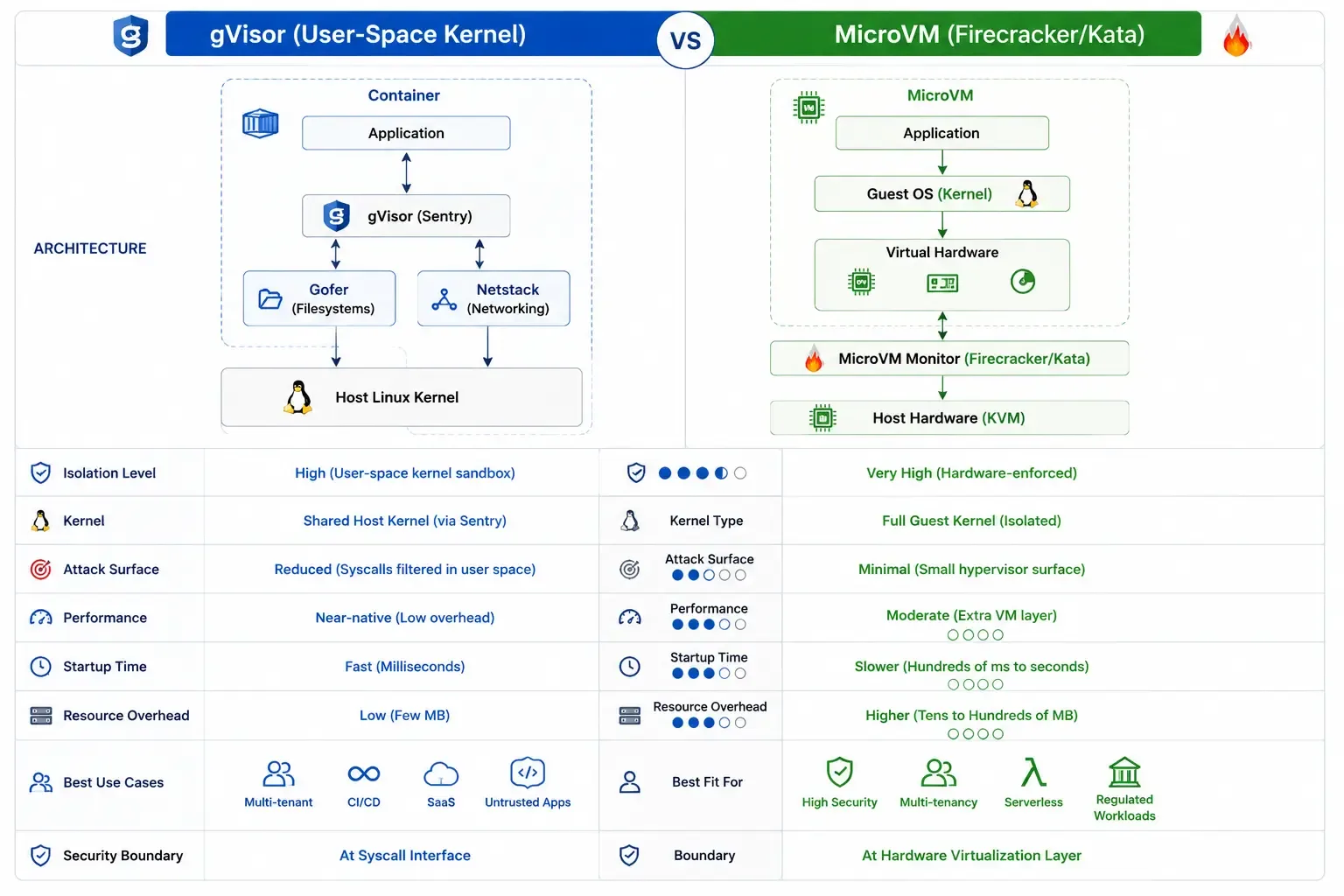
gVisor implements a lightweight, memory-safe kernel in Go (Sentry) that intercepts syscalls from the application container. It runs the workload in a sandboxed process, translating operations to the host kernel via a limited interface (Gofer for filesystem).
Advantages:
- Significantly reduces the attack surface exposed to the host kernel.
- Strong compatibility with existing container images.
- Lower overhead than full VMs for many workloads.
- Suitable for multi-tenant SaaS and CI/CD pipelines.
gVisor runs on its default Systrap platform or, on hosts that support it, with KVM hardware acceleration.
MicroVMs and Hardware-Backed Isolation
Firecracker (the microVM behind AWS Lambda and AWS Fargate) and Kata Containers give each workload its own lightweight virtual machine, backed by hardware virtualization (KVM/VT-x).
Key Benefits:
- Full guest kernel per workload.
- Hardware-enforced memory and execution isolation.
- Minimal hypervisor attack surface.
- Excellent for untrusted or high-security workloads.
While microVMs incur higher resource overhead and slower cold starts compared to native containers, they eliminate entire classes of kernel-based escapes.
Hybrid models using gVisor for most workloads and microVMs for sensitive ones offer practical balance.
Auditing Your Container Environment
Effective auditing requires systematic assessment:
- Image Scanning: Use tools like Trivy, Grype, or Anchore to detect vulnerabilities in base images and dependencies.
- Runtime Configuration Checks: Tools such as kube-bench, CIS Docker Benchmark, and Falco for anomaly detection.
- Kernel and Runtime Patching: Regularly update host kernels and runtimes (runc, containerd).
- Privilege Review: audit for privileged containers, host mounts and excessive capabilities with
kubectl get pods --all-namespaces -o yaml | grep -nE 'privileged: true|hostPath|hostPID: true|hostNetwork: true|SYS_ADMIN'. - Network and Access Controls: Verify network policies, RBAC, and Pod Security Admission (PSA) enforcement.
Implement continuous monitoring with eBPF-based tools like Cilium Tetragon or Sysdig for runtime threat detection.
How to Detect a Container Escape Attempt
Prevention reduces the risk, but you still need to see an attempt when it happens. These behaviours are rare in normal workloads and common during escapes:
- A shell starting inside a container that never normally runs one.
nsenter,unshare,mountorchrootrunning inside a container.- Writes to
/proc/sys,/sys/fs/cgroupor a cgrouprelease_agentfile. - A container process opening
docker.sockorcontainerd.sock. - New processes on the host whose parent is the container runtime, or unexpected kernel modules loading.
Falco detects many of these out of the box. Its default “Terminal shell in container” rule is a good first alert. You can add your own rules for anything specific to your environment, such as this one:
- rule: Namespace tool run in container
  desc: nsenter or unshare executed inside a container
  condition: spawned_process and container and proc.name in (nsenter, unshare)
  output: "Namespace tool in container (user=%user.name cmd=%proc.cmdline container=%container.name image=%container.image.repository)"
  priority: WARNING
eBPF tools such as Cilium Tetragon, and auditd rules on the host, add a second layer. If an alert does fire, treat the host as compromised, not just the container, and follow the same steps you would use to detect malware on Linux servers.
Container Escape Prevention Checklist
Most escapes need either a risky setting or an unpatched kernel or runtime. Locking down the settings below removes the easy paths and makes kernel bugs much harder to reach.
| Setting | Why it matters | How to apply |
|---|---|---|
| Run as non-root | Root inside the container becomes root on the host if isolation fails. | runAsNonRoot: true and a non-zero runAsUser. In Docker, a USER line in the Dockerfile. |
| Block privilege escalation | Stops setuid binaries from gaining privileges. | allowPrivilegeEscalation: false. In Docker, --security-opt no-new-privileges. |
| Drop all capabilities | CAP_SYS_ADMIN and similar capabilities open most escape paths. | capabilities.drop: ["ALL"], then add back only what the app needs. |
| Default seccomp profile | Blocks system calls that apps rarely need but exploits often use. | seccompProfile.type: RuntimeDefault |
| No privileged containers | Privileged mode gives access to host devices. | Never set privileged: true in production. |
| No host namespaces or host paths | hostPID, hostNetwork, hostIPC, hostPath and docker.sock mounts reach straight into the host. | Leave them unset and never mount /var/run/docker.sock. |
| Read-only root filesystem | Makes it harder for an attacker to drop tools. | readOnlyRootFilesystem: true, with writable volumes only where needed. |
| Enforce Pod Security Standards | Blocks risky pods cluster-wide. | kubectl label namespace <name> pod-security.kubernetes.io/enforce=restricted |
| User namespaces | Container root maps to an unprivileged user on the host. | hostUsers: false on Kubernetes versions that support it, or Docker rootless mode / userns-remap. |
| Patch kernel and runtime | Closes the bugs in the table above. | Track kernel, runc and containerd updates, and reboot nodes onto new kernels. |
| Sandbox untrusted workloads | Puts a second boundary around code you don’t trust. | gVisor or Kata Containers through a Kubernetes RuntimeClass. |
| Keep secrets out of images | Leaked secrets turn one escape into a wider breach. | Use an external secret store such as HashiCorp Vault or AWS Secrets Manager. |
A pod spec that applies the core settings looks like this:
apiVersion: v1
kind: Pod
metadata:
  name: web
spec:
  securityContext:
    runAsNonRoot: true
    runAsUser: 10001
    seccompProfile:
      type: RuntimeDefault
  containers:
  - name: web
    image: registry.example.com/web:1.4.2
    securityContext:
      allowPrivilegeEscalation: false
      readOnlyRootFilesystem: true
      capabilities:
        drop: ["ALL"]
Long-Term Security Best Practices
- Shift-Left Security: Integrate scanning, signing (cosign), and policy enforcement (Kyverno, OPA/Gatekeeper) in CI/CD pipelines.
- Least Privilege Everywhere: Apply the principle at image build, runtime, and orchestration layers.
- Defense-in-Depth: Combine namespaces, seccomp/AppArmor/SELinux profiles, network policies, and runtime sandboxes.
- Zero-Trust Architecture: Assume breach; implement micro-segmentation and continuous verification.
- Monitoring and Incident Response: Deploy runtime security platforms capable of detecting anomalous syscalls or file accesses indicative of escape attempts.
- Hardware and Hypervisor Enhancements: Leverage confidential computing (e.g., AMD SEV, Intel TDX) for advanced use cases.
For Linux security professionals, staying informed about kernel CVEs and testing isolation boundaries through red-team exercises remains essential.
MaxProtect monitors and hardens the servers your containers run on, including Kubernetes and container workloads on AWS, with prompt kernel patching and 24/7 human-led SOC monitoring on our managed server security plan.
The Road Ahead for Cloud-Native Security
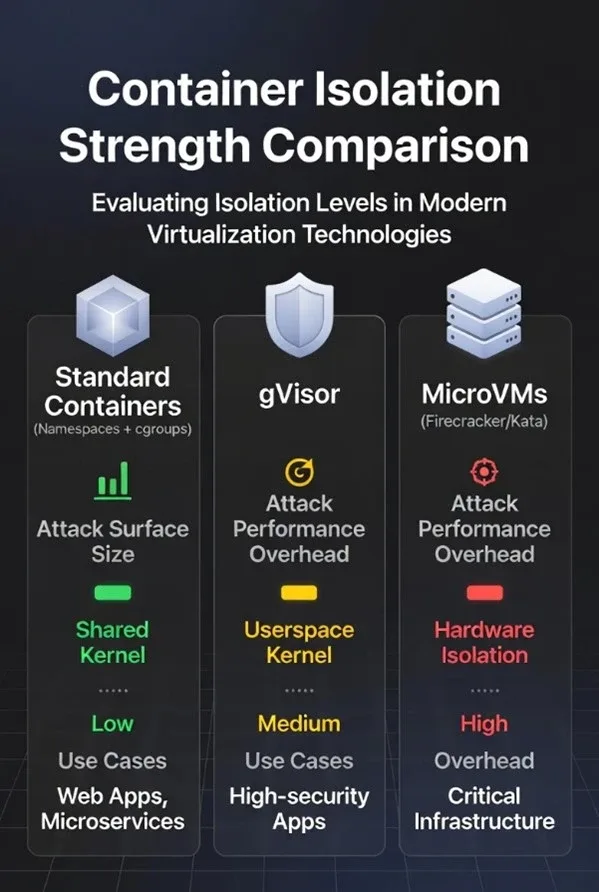
The evolution from namespace-based isolation to hardware-backed and user-space kernel models reflects the maturing understanding of container threats. While shared-kernel architectures will continue powering the majority of workloads due to their efficiency, critical and multi-tenant environments benefit from layered defenses that incorporate microVMs or gVisor.
By treating containers as untrusted by default and investing in robust isolation, organizations can realize the full benefits of cloud-native architectures without compromising security.
The Linux security community continues to advance these boundaries through projects like gVisor, Kata Containers, and ongoing kernel hardening. Proactive adoption of these technologies positions enterprises to securely scale their containerized infrastructures.
Frequently Asked Questions
Can a container escape to the host?
Yes. Containers share the host’s kernel, so a kernel or runtime vulnerability, a privileged container, a dangerous capability such as CAP_SYS_ADMIN, or a mounted Docker socket can let a process break out and act on the host. Running as non-root, dropping capabilities, using the default seccomp profile and patching quickly close most of these paths.
Are rootless containers safe from container escape?
They’re much safer, not immune. In rootless mode, or with user namespaces, root inside the container maps to an unprivileged user on the host, so a breakout lands with limited rights. A kernel privilege-escalation bug can still raise those rights, which is why kernel patching still matters.
Does gVisor prevent container escapes?
gVisor greatly reduces the risk. It intercepts the container’s system calls with its own user-space kernel, so most host kernel bugs can’t be reached directly. It isn’t a guarantee, and some workloads see a performance cost or compatibility issues. MicroVMs such as Kata Containers or Firecracker give a hardware-backed boundary instead.
Is Kubernetes more exposed to container escape than plain Docker?
The escape techniques are the same, but Kubernetes adds more ways to request risky settings (privileged pods, hostPath, host namespaces, broad service-account permissions) and packs many workloads onto each node. Enforcing the Restricted Pod Security Standard and tight RBAC removes most of that extra exposure.
How do I check whether my containers run privileged?
In Kubernetes, run kubectl get pods --all-namespaces -o yaml and search for privileged: true, hostPath, hostPID, hostNetwork and SYS_ADMIN. Tools such as kube-bench and Trivy report the same issues against the CIS benchmarks. On a Docker host, docker inspect shows each container’s Privileged flag and its mounts.